AWS Series: Critical Security Logging Pt. 2
In part 2 of the AWS Series, we will dive deeper into critical security logging, specifically at the Host and Application layers. This will tie together all layers of AWS security and cover many services that are not turned on by default, but many of which are crucial for full lifecycle investigations.
Host Layer
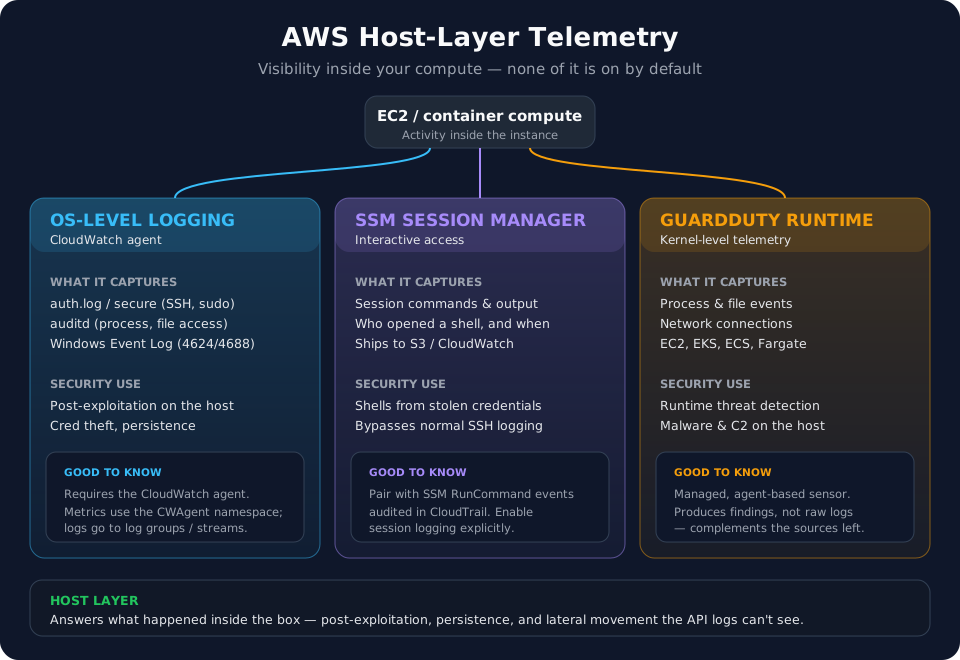
OS Level Logging
When investigating EC2 instances, CloudTrail and CloudWatch are blind to activity occurring within the instance. In order to investigate activity within compute instances, CloudWatch agents need to be installed. This ships OS level telemetry such as auth.log, auditd, and Windows event logs into a CloudWatch log group (with agent metrics under the CWAgent namespace) for near real-time analysis and metric driven alarms.
Without the CloudWatch agent installed, logs are not shipped and are standalone on each instance unless configured otherwise. This is an issue in a large corporate environment where you are running 300 EC2 instances.
Containers operate a bit differently, requiring Container Insights to be enabled and the AWS log driver being responsible for shipping stderr/stdout to AWS.
SSM Session Manager Logs
AWS Systems Manager (SSM) is commonly used by threat actors to gain a shell on EC2 instances or auto-deploy malware to managed machines. Thankfully, there is a session manager log that records all interactive commands used within a session that ships to S3/CloudWatch. Pair this with SSM RunCommand audit logs within CloudTrail and you can quickly identify malicious activity within SSM.
GuardDuty Runtime Monitoring
GuardDuty runtime monitoring agents record process/network connections at the kernel level, which acts as amazing detection telemetry.
Application Layer
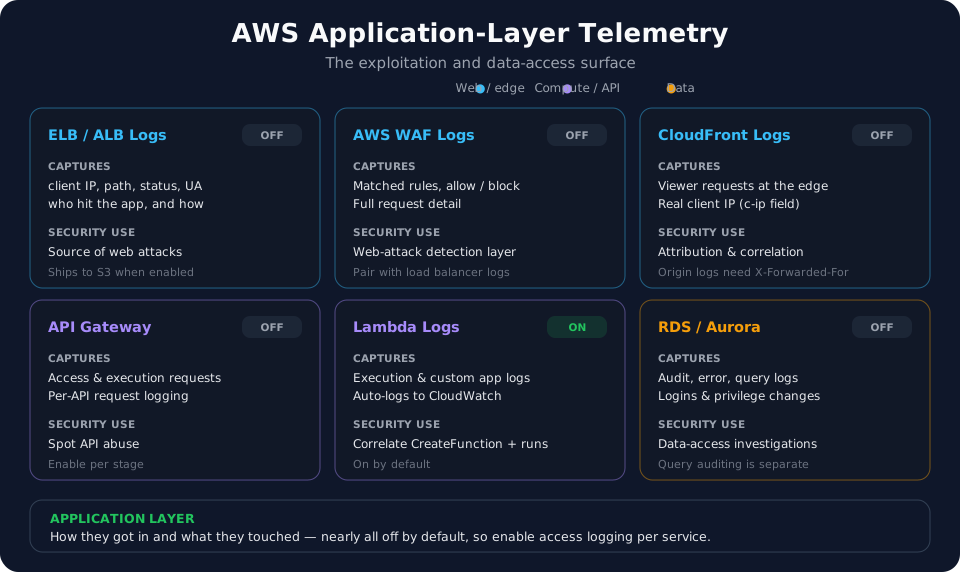
ELB/ALB Logs
Load balancer logs are crucial for identifying the source of web attacks. When turned on, the logs provide details such as clientip, useragent, path, and status. Digging into these logs can assist in uncovering novel web attacks against resources. These are not turned on by default, but when on, ship by default to S3.
AWS WAF Logs
AWS web application firewall logs act as the detection layer for applications, blocking traffic based on preset rules. Pair this with load balancer logs and identifying novel web attacks becomes very accessible.
API Gateway Logging
If an API gateway is being utilized, logs can be turned on to monitor access and execution requests made to the gateway.
RDS & Aurora Logging
Database logging within AWS is crucial for data access investigations. Ensuring these logs are turned on provides audit information such as access to the database, error logs, query logs (auditing must be turned on), and privilege changes to the database. Without these logs, answers to questions like “Did the threat actor touch our database?” or “What tables did the threat actor target?” are not possible to answer.
Lambda Logs
Lambda functions log directly to CloudWatch by default, providing logs for execution and custom app logging. If you need to investigate a function created by a threat actor, correlating CreateFunction and any execution logs within CloudWatch will be crucial for understanding the impact of the Lambda function.
CloudFront Logs
CloudFront CDN logs are actually valuable for attribution. Because they are written at the edge, where the viewer connects, they record the real client IP in the c-ip field along with the user-agent, URI, and status. The catch is on the origin side: resources sitting behind CloudFront (ALB, EC2, S3) see requests coming from a CloudFront edge IP, so their access logs lose the true source unless you read the X-Forwarded-For header that CloudFront injects. CloudFront logs ship to S3 by default when enabled.
This wraps up a majority of the critical logging in AWS, setting a baseline of required AWS knowledge moving forward.
The next post in the AWS series will dive deeper into attack paths within AWS and how threat actors exploit services we all use every day.
Thanks for reading!
-Austin