AWS Series: Critical Security Logging
Control & Resource Layer
CloudTrail
At some point during an incident within AWS, you will find yourself analyzing CloudTrail logs. CloudTrail logs serve as the main audit log for all API calls that occur within your AWS environment.
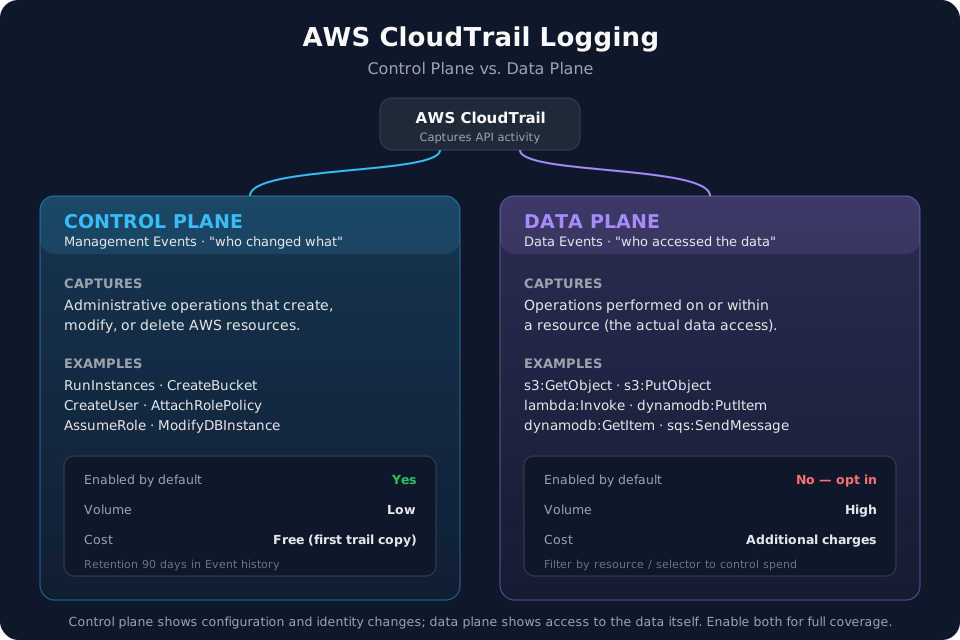
A crucial concept to understand in AWS Security, is the difference between control (management) plane events and data plane events. CloudTrail by default collects all control plane events for 90 days once a trail is created. These logs tell us the following: WHO, WHAT, WHEN, and WHERE, leaving you to determine the WHY. This includes changes to Users, Roles, Trust Policies, Resource Policies, EC2 creations, S3 deletions, etc.
Data plane events (not enabled by default) are responsible for telling us WHO, WHAT, WHEN, and WHERE, but for what is happening inside the resource, not simple events such as creation, modification, and deletion within the service. For example, S3 buckets do not have data plane logging available by default. Without the data plane logging turned on, we are unable to gain additional telemetry such as PutObject | GetObject | DeleteObject. This renders investigators blind to what is occurring within the bucket itself, leaving a lot of security telemetry unavailable.
Ex: If a company experiences a breach of a public S3 bucket that was misconfigured and they do not have data plane logging turned on, it will not be possible to answer the questions of what was downloaded, uploaded, or deleted from the bucket at a specific time.
Data plane logs are crucial if you want to know what is happening inside the resource. Below represents a visual of the critical distinction between the two.
CloudWatch
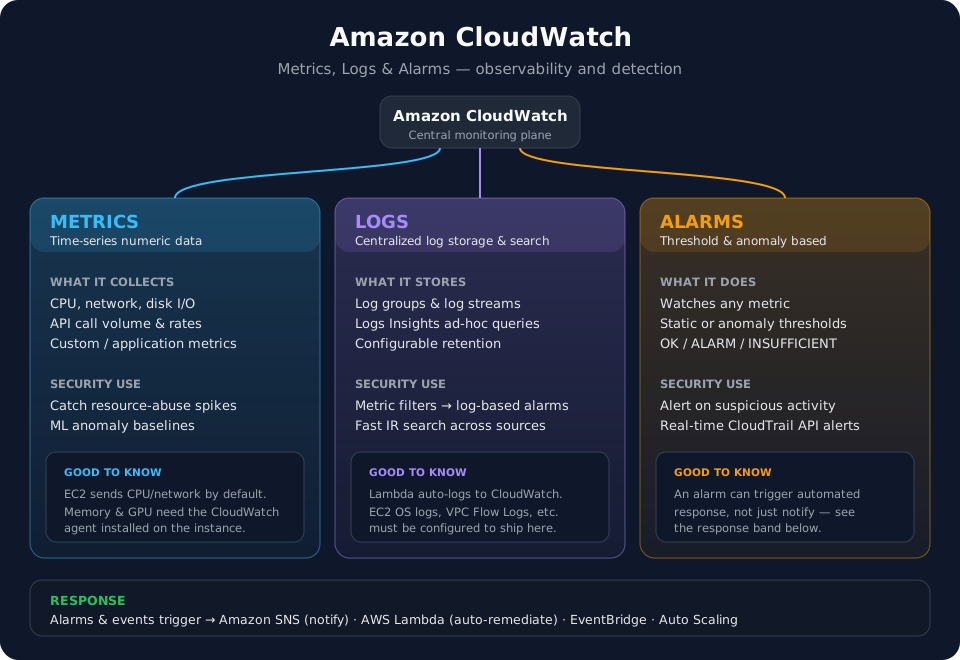
When you see or hear the word CloudWatch, your next thought should be metrics, logs, and alarms. CloudWatch allows real time log analysis for all logs that are being collected. CloudWatch records details such as CPU Utilization, increase in volume of API calls, logging for EC2 instance states, and much more depending on configuration. CloudWatch can be used to centrally store logs for all resources/applications and utilizes metrics and alarms to alert on abnormal or suspicious activity. For example, CloudTrail can ship logs to CloudWatch which then enables metric driven alarms and real time alerting. Without CloudWatch, the logs simply exist, they are not alerted on.
Ex: A threat actor compromises an EC2 instance and installs a cryptominer on the instance. This makes the CPU consumption jump very quickly and stay high for a long period of time, which is abnormal activity. You have a CloudWatch alarm set to monitor for >= 85% CPU Utilization over 5 minutes. You quickly catch the compromise and remediate appropriately.
CloudWatch Logs Insights enables you to query any log set that exists for real time analysis, rather than simple filtering within Event History in CloudTrail for example.
CloudWatch also integrates with SNS, EventBridge and Lambda, allowing for custom automated response and remediation measures for any metric driven alarm that you decide to create.
AWS Config
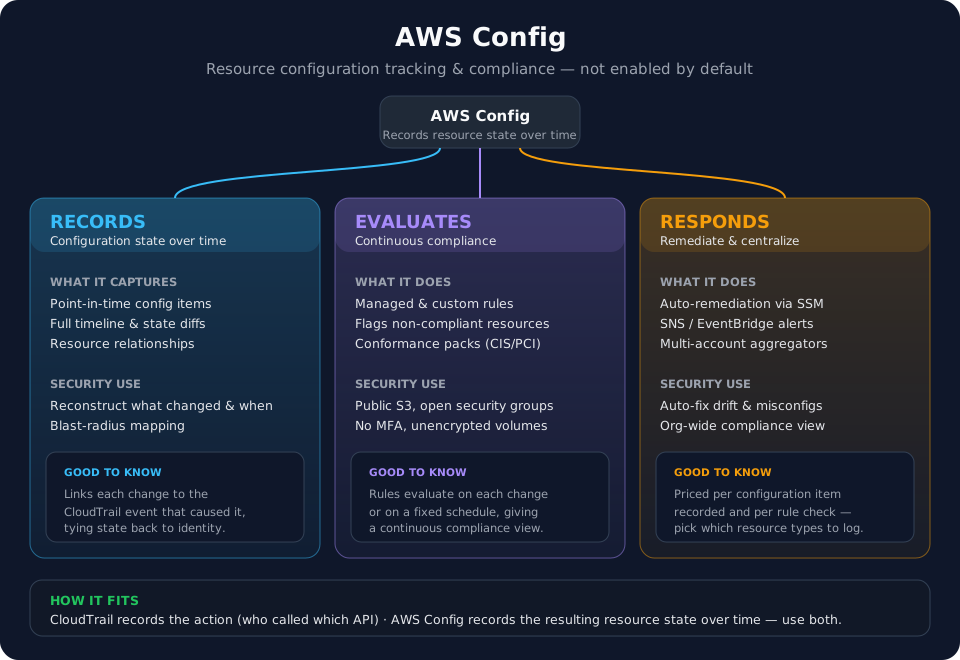
AWS Config is not turned on by default, however, is arguably one of the strongest security tools AWS offers. Config can be used to track changes to AWS resources; this can be changes to Roles, EC2 Instances, Lambda functions, and more. Config snapshots each configuration item via a master timeline, allowing you to identify the exact in time state of a role, policy, etc. This timeline also diffs the current state from the past state, allowing you to identify changes quickly and easily.
From a security perspective, tracking configuration changes is a gold mine when dealing with a compromise. This allows an investigator to follow a threat actor and the resources modified by them throughout an incident. Or from an architect perspective, allows developers to track configuration changes to Lambda functions and ensure code parity between colleagues.
Config Rules - Allows you to state a desired baseline to compare resources against. If a security group allows “0.0.0.0/0” it can be flagged as non-compliant. While the security timeline is amazing for investigations, the evaluation side of Config can be utilized to prevent insecure resources to begin with. Like CloudWatch, Config can be used with automation to auto-remediate non-compliant resources.
Additional details in the visual below.
Network Layer
VPC Flow Logs
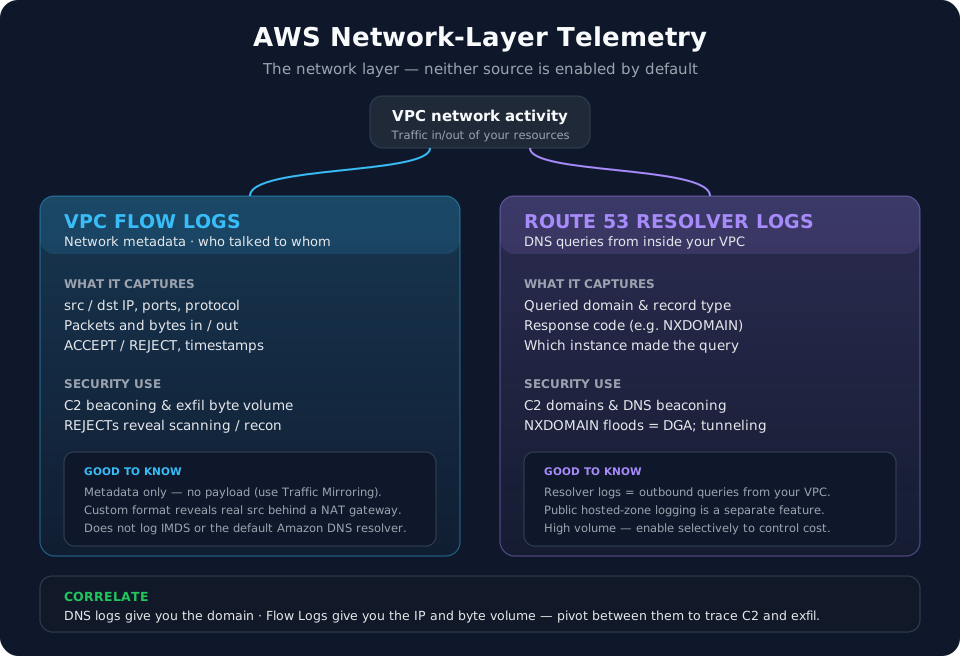
VPC flow logs track all metadata network activity between resources, allowing you to track network connections, bytes in/out, and malicious beaconing. VPC flow logs are crucial for catching C2 (Command and Control) beaconing activity from within your AWS environment. The caveat here is the logs are metadata only, src_ip, dst_ip, bytes_in, bytes_out, port | protocol, timestamps, and ACCEPT | REJECT. If you want to see the payload attached to the connection, you must look into VPC Traffic Mirroring. Make sure you look into custom formats for the VPC logs and not just accept the default as it hides a lot of the crucial details, such as the actual src_ip behind the NAT gateway.
Flow logs are great at catching REJECTs for port scanning and failed C2 attempts as well. Do not always filter REJECTs out by default when first investigating logs.
Flow logs do not log DNS requests or connections to IMDS (169.254.169.254).
Ex: Your AWS environment was compromised, EC2 instances encrypted by Ransomware, and data supposedly stolen by a threat actor. VPC flow logs allow you to see the bytes out and determine to an extent of how much data was actually stolen. Crucially, we do not see WHAT was taken, this is purely an estimate.
Route 53 DNS Resolver Logs
Not enabled by default, Route 53 as a global service can be configured to collect DNS resolver logs. There are many benefits to this such as catching C2 server names, DNS Tunneling/Exfil, and overall having more networking telemetry to sift through to correlate domains and IPs within VPC flow logs. Given these are DNS logs, the cost to store the amount of logs generated is not very cost friendly, so configure sparingly.
Worth noting as well, these logs can be configured to also just catch public hosted-zone logging, which catches DNS requests made to instances you own. Resolver queries are more useful for security purposes, but both have their own use cases.
Look forward to the next post in the AWS series where we will cover additional logging such as host layer and application layer logging. As we dig deeper into AWS, we will focus on actual attack paths, the logging to identify those attacks, and detections and preventions to cover our businesses moving forward.
Thanks for reading!
-Austin